Python Product Automation System
Case Study: Scalable Data Pipeline & Product Processing Engine
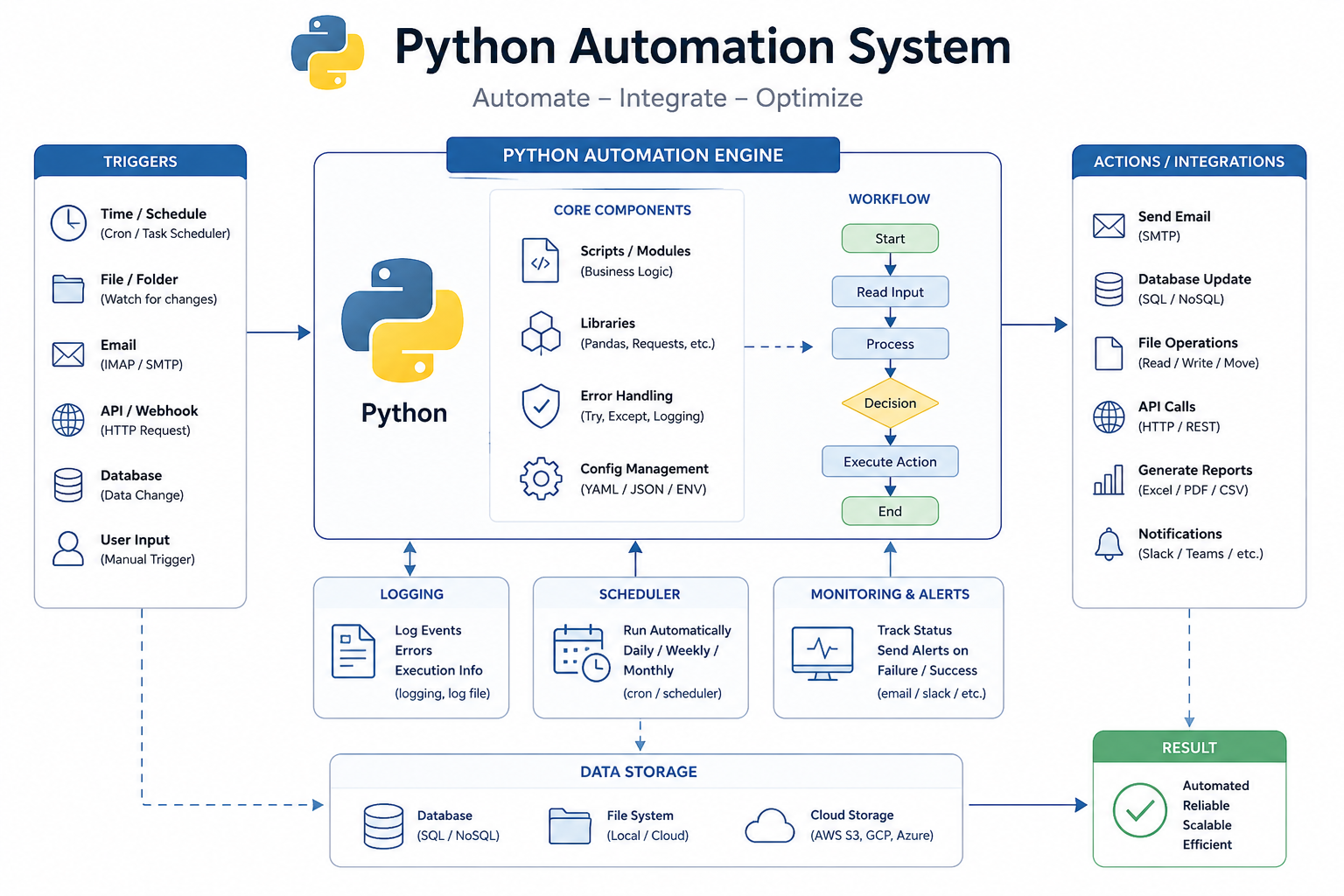
Overview
This project started from a pretty common situation. Product data was coming in from multiple sources, but none of it matched. Different formats, different field names, missing values, duplicates, and no real structure tying it all together. At first it was manageable manually, but once the dataset started growing, it quickly turned into something that wasn’t sustainable.
What I ended up building was a Python-based pipeline that takes raw product data from different inputs and runs it through a structured process to clean it, standardize it, and output it in a usable format. The goal wasn’t just to automate tasks, it was to make the data reliable enough that it didn’t need constant attention.
What was actually going wrong
The biggest issue wasn’t just messy data, it was inconsistency at every level.
One source might label a field one way, another source would use something slightly different, and a third might not include it at all. Even when the data was technically there, formatting differences made it hard to use without reworking it. Pricing formats, product names, categories, and descriptions all had subtle differences that added up.
Duplicates were another problem. Some were obvious, but others weren’t. If a SKU was missing or inconsistent, you’d end up with multiple versions of what was essentially the same product. Over time that created confusion and made it harder to trust the dataset.
On top of that, every time the data needed to be used somewhere else, it had to be reshaped again. That meant repeating the same cleanup work over and over, which is where most of the time was being lost.
How I approached it
Instead of trying to fix everything in one pass, I broke the process into stages. That made it easier to control what was happening at each step and also made it easier to debug when something didn’t look right.
The first step is ingestion. The system pulls in raw data and does some basic validation. It doesn’t assume anything about the quality of the input, so it handles encoding issues, missing columns, and malformed rows up front. That prevents bad data from breaking things later.
After that, everything goes through normalization. This is where most of the cleanup happens. Field names get aligned, values are formatted consistently, and data types are corrected. It’s not flashy, but this is the step that makes the rest of the system possible.
Deduplication comes next. Since there isn’t always a perfect identifier, I had to rely on a combination of fields to determine whether two records are actually the same. The system compares key attributes and applies a set of rules to decide which version to keep. The goal isn’t just to remove duplicates, but to keep the best version of each product.
Once the data is clean and unique, it moves into transformation. This is where it gets shaped into whatever format is needed downstream. That includes generating things like slugs, reorganizing fields, and preparing the data so it can be used directly without additional work.
What the build looked like
The whole pipeline is written in Python and built around batch processing. I used dataframes for most of the operations so I could handle large datasets efficiently without looping through everything manually.
Each stage is broken into its own function, which made it easier to work on one piece at a time. If something needed to change in normalization, it didn’t affect how ingestion or output worked. That separation ended up being important once edge cases started showing up.
I also added logging throughout the pipeline. Not just for errors, but for tracking what decisions the system was making. That made it a lot easier to troubleshoot issues without stopping the entire process.
One thing that came up pretty quickly was handling bad data without breaking everything. Instead of failing on a single bad record, the system just flags it and moves on. That keeps the pipeline stable even when the input isn’t perfect.
Challenges that came up
A lot of the complexity came from edge cases.
Some datasets were missing fields entirely, others had values in unexpected formats, and some records were technically valid but still inconsistent in ways that caused problems later. Getting the system to handle those cases without becoming overly complicated was a balancing act.
Deduplication was probably the trickiest part. Without a single reliable key, you have to make judgment calls based on partial matches. The goal was to reduce duplicates without accidentally merging things that shouldn’t be merged.
Another challenge was making sure the system stayed predictable. It’s easy for pipelines like this to become hard to follow if too many special cases are added. Keeping each step focused and controlled helped avoid that.
What changed after it was done
Once the pipeline was in place, most of the manual work around product data disappeared.
Instead of spending time cleaning and reformatting data, the process became: drop in the raw dataset, run the pipeline, and get a clean output. The time savings were significant, but more importantly, the data became consistent.
Duplicates were reduced, formatting issues were gone, and the outputs could be used directly without additional cleanup. That made everything downstream easier, whether it was uploading products, analyzing data, or integrating with other systems.
What I took from it
The biggest takeaway is that automation only works if the data going through it is predictable. Spending time on normalization early makes everything else simpler.
Breaking the system into stages also made a big difference. It kept things manageable and made it easier to adapt when new requirements came up.
And probably the most important part, building for imperfect data is not optional. Real-world datasets are messy, and the system has to handle that without falling apart.
Final thoughts
This ended up being more than just a script to clean data. It turned into a system that takes unreliable input and produces something consistent and usable every time.
Instead of constantly fixing product data, it now runs in the background as part of the workflow. It’s stable, repeatable, and designed to scale as the dataset grows.